
Scope of this technical record
Combined F0001/F0002 workflow that classifies ramp, load, motor-cable and output-stage boundaries before hardware replacement.
Do not run repeated tests on an overcurrent or overvoltage trip until the machine load is safe and the DC-link/output boundary is understood.
MICROMASTER ramp/load workflow route
The workflow routes both acceleration current and deceleration energy before hardware escalation.
MICROMASTER F0001 / F0002 workflow map
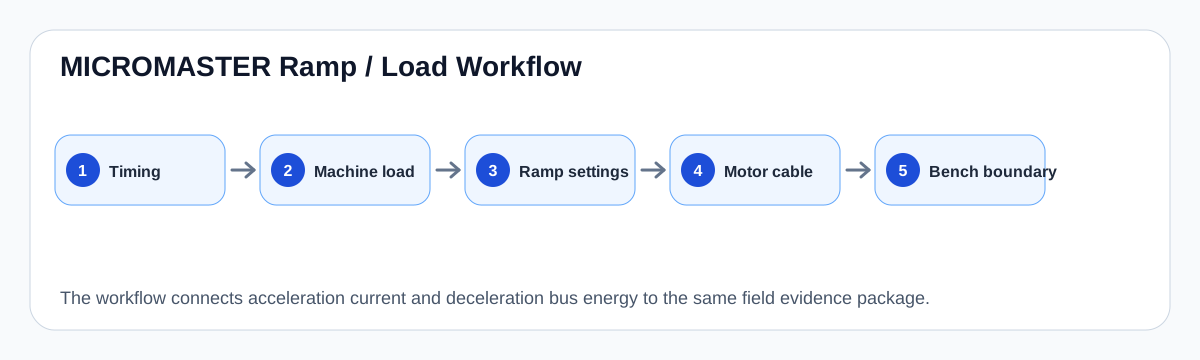
Workflow logic
This workflow deliberately pairs F0001 and F0002 because technicians often see them in the same family of ramp/load events. Acceleration stresses current; deceleration stresses DC-link voltage. A fan or pump system can move between both conditions as the process changes.
The sequence is timing first, mechanical load second, ramp/parameter context third, motor-cable boundary fourth and drive hardware last. Moving to power-board repair before the first four stages risks a repeat fault.
Workflow decision gates
| Gate | Pass evidence | Escalate if |
|---|---|---|
| Timing | Fault moment documented | Timing is unknown or reset erased history |
| Mechanical load | Fan/pump load safe and free | Blocked load or process event exists |
| Ramp parameters | Ramp and stop values recorded | Settings are unknown or recently changed |
| Motor/cable | External path tested safely | Short, leakage or output accessory issue remains |
| Drive hardware | External causes cleared | Fault persists with credible test boundary |
Bench boundary
Bench work becomes appropriate when the fault persists after field evidence is credible, when a previous power-module repair has failed, or when static output-stage/current-feedback checks are abnormal. The field record should travel with the drive so the repair shop does not repeat unsafe powered tests.
Field record checklist
- Exact fault and warning sequence
- Ramp and stop values
- Machine condition
- Motor/cable evidence
- Brake hardware
- Previous repairs
- Reason for bench escalation
Technical basis and reference documents
This is an independent editorial technical reference. Original manufacturer documentation remains controlling for installation, repair and commissioning decisions.
OEM operating material used for MICROMASTER 430 safety, fault and commissioning context.
Manufacturer reference for parameter, fault and alarm routing around the MM4 platform.
Linked records
F0001 is useful only after the trip timing is classified. It can be caused by load or ramp demand, motor/cable faults, parameter mismatch, output accessories, current-limit behaviour or an internal output-stage/current-feedback boundary.
F0002 usually asks whether the DC bus rose because the machine regenerated energy faster than the drive could absorb, because the ramp is too short, because braking hardware is missing/faulty, or because the input/DC-link measurement is abnormal.
Maps the field evidence path for MICROMASTER F0001/F0002 events: mains rectification, DC-link storage, ramp generator demand, load inertia, braking/regen behaviour and the inverter output stage.
Most voltage-source AC drives follow a common conversion chain: mains input is rectified to a DC bus, filtered by the DC-link stage and switched through an inverter bridge to produce a controlled three-phase motor output.
Turn this record into a qualified service request
A repair decision is much more reliable when the request includes the exact identity of the drive, the first fault evidence and the machine condition when the symptom appeared.
- Complete drive type code / MLFB or nameplate model
- Fault code, fault value and first event before reset
- When the event appears: power-up, enable, ramp, run, decel or stop
- Motor/cable connected or isolated during the symptom
- Visible board, option-card, module and connector identifiers
- Previous repair history, replacement parts and repeat-failure pattern