
Scope of this technical record
Routes PowerFlex F13 Ground Fault through motor/cable insulation, moisture, output-terminal, output-accessory and current-sensing evidence before internal drive repair.
Never megger through the drive. Disconnect and isolate the motor/cable correctly before insulation testing. Do not repeatedly reset into a suspected ground fault.
F13 ground-fault route
Ground faults are external until the motor and cable path is proven clear.
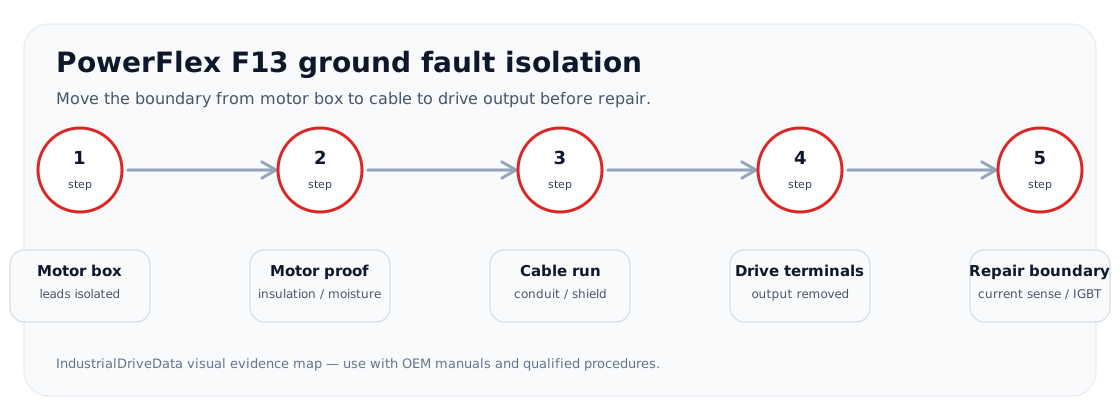
F13 ground-fault isolation image
Service decision coverage
F13 users need to know where the ground path is, not just what the code means. This panel mirrors the isolation order that decides whether the motor, cable or drive-side output path is responsible.
| Observed situation | Decision needed | Evidence that satisfies the case |
|---|---|---|
| Fault clears at motor-box isolation | Motor or motor-terminal issue | Insulation result and terminal-box photos |
| Fault clears only at drive-terminal isolation | Cable/conduit issue | Cable megger result and route inspection |
| Fault remains with drive output leads removed | Drive-side repair boundary | Static output/current-sense evidence |
Why F13 is usually a field-boundary problem first
A ground fault indication means the drive has detected a ground-current or imbalance condition on the output path. The first repair boundary is the motor, cable, terminal box, shield/grounding and any output accessory. Only after that evidence is credible should the current-sense or output-stage hardware be suspected.
Intermittent F13 cases are often more valuable than permanent ones because timing points to moisture, cable movement, vibration, temperature or process state. Record when the fault appears before clearing it.
F13 diagnostic matrix
Do not collapse all F13 cases into “bad drive.” Use the event pattern to decide the next proof.
F13 pattern split
| Pattern | Likely boundary | Evidence to capture |
|---|---|---|
| Instant on enable | Cable/motor or output bridge | Disconnected-output behaviour and insulation evidence |
| Only after rain/washdown | Moisture and motor terminal box | Photos, insulation-to-ground, cable glands |
| With cable movement | Cable/shield termination | Route and bend points |
| After module replacement | Driver/current-sense or unresolved field fault | Repair history and pre-power checks |
| F13 followed by F12 | Ground event producing high current or output-stage damage | Fault queue order and static output checks |
Repair boundary
If the fault follows the motor/cable, the drive-side repair route should stop. If the fault remains with the output path proven and disconnected under qualified procedure, the request can move toward current-sense, output module or gate-driver evidence.
Field record checklist
- Fault timing
- Moisture/cable movement
- Insulation evidence
- Disconnected-output result
- F12/F13 order
Technical basis and reference documents
This is an independent editorial technical reference. Original manufacturer documentation remains controlling for installation, repair and commissioning decisions.
OEM safety and drive troubleshooting context.
Diagnostic workflow
Turn this record into a qualified service request
A repair decision is much more reliable when the request includes the exact identity of the drive, the first fault evidence and the machine condition when the symptom appeared.
- Complete drive type code / MLFB or nameplate model
- Fault code, fault value and first event before reset
- When the event appears: power-up, enable, ramp, run, decel or stop
- Motor/cable connected or isolated during the symptom
- Visible board, option-card, module and connector identifiers
- Previous repair history, replacement parts and repeat-failure pattern