
Allen-Bradley PowerFlex AC drives / VFDs
Technical records for Allen-Bradley PowerFlex industrial drives, beginning with PowerFlex 520 and 750 service routes for hardware overcurrent, ground fault, DC-bus overvoltage/undervoltage and DPI port-loss communication symptoms.
Scope of this technical record
Brand-level routing for Allen-Bradley PowerFlex fault cases where a plant technician must decide whether the evidence belongs to the motor/output path, DC bus/braking path, or HIM/DPI communication chain before replacing the drive.
PowerFlex drives contain hazardous stored energy. Output, DC-bus, brake-resistor and communication tests must be performed only by qualified personnel with the machine secured and the DC bus verified discharged where access is required.
PowerFlex evidence routing map
Preserve the first fault and prove the external boundary before ordering a drive, module or HIM.
PowerFlex output and DPI evidence map
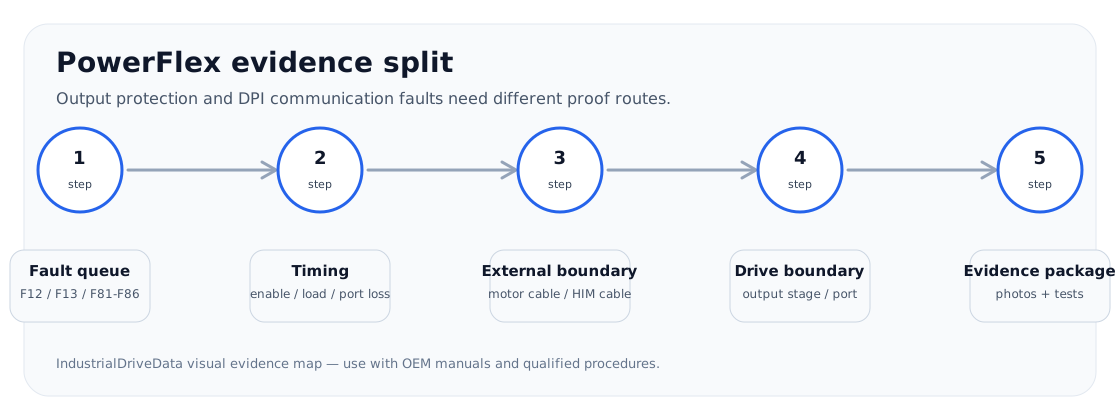
Why PowerFlex cases need an evidence route
PowerFlex repair cases are rarely generic. A technician normally arrives with a short code such as F12, F13, F5, F4 or F81 and a production condition: at enable, during acceleration, when a load stops, after rain, when a door moves, or after a HIM/network device has been replaced. That timing is more useful than the code alone.
The brand hub therefore splits cases into three first boundaries: output current and ground-fault evidence, input/DC-bus/braking evidence, and DPI/HIM peripheral communication evidence. A PowerFlex replacement decision should not be made until the relevant boundary has been documented.
PowerFlex first-split map
| Service case pattern | Most useful first evidence | Likely service path |
|---|---|---|
| F12 / F13 near start | Fault queue, motor/cable isolation, load and brake state | Output path and current/ground evidence |
| F5 during stop or decel | DC bus trend, load inertia, brake resistor/chopper evidence | Regeneration and braking path |
| F4 on start or plant sag | Input voltage at drive terminals, contactor/fuse/precharge evidence | Input and DC-bus path |
| F81-F86 / HIM loss | Port number, connected device, cable movement and noise environment | DPI/HIM communication path |
How this section should beat fault-code lists
A table of PowerFlex codes is useful only as a label. A repair page needs to preserve the first fault, tie the event to load and wiring evidence, and define the stop condition that prevents a destructive retest. For example, F12 and F13 often need to be read together because a motor-cable or output-stage event can present as both overcurrent and ground-fault evidence within the same incident window.
Communication pages also need the machine-control boundary. A port-loss response may change command source, status feedback or safe stopping behaviour, so masking the action without controls review can create a safety and uptime risk.
Evidence needed for repair or replacement
A support request should include the exact PowerFlex type, frame, firmware/context if known, complete fault queue, event timing, motor/cable state, brake/load evidence, and any changed HIM, DPI cable, adapter or network hardware. For F5/F4 cases, input voltage and DC-bus behaviour matter more than a photo of the keypad alone.
For F12/F13 cases, an actionable record distinguishes external path evidence from drive-side evidence. For F81-F86, it distinguishes device/cable/noise behaviour from a failed port or main control board.
- Complete type code and frame size
- Fault queue and first fault, not only the final displayed fault
- Exact timing: enable, ramp, load, decel, stop, network event or door/cable movement
- Motor/cable insulation and output-accessory evidence where applicable
- DPI/HIM device, cable routing and noise/grounding evidence for port-loss cases
Field record checklist
- PowerFlex type code
- Fault queue order
- Event timing
- Motor/cable or DC-bus evidence
- HIM/DPI device context
Technical basis and reference documents
This is an independent editorial technical reference. Original manufacturer documentation remains controlling for installation, repair and commissioning decisions.
OEM source for PowerFlex 520-series installation, wiring, programming and fault handling context.
OEM quick-start reference for terminal wiring, basic startup and safety boundaries.
Available series
Turn this record into a qualified service request
A repair decision is much more reliable when the request includes the exact identity of the drive, the first fault evidence and the machine condition when the symptom appeared.
- Complete drive type code / MLFB or nameplate model
- Fault code, fault value and first event before reset
- When the event appears: power-up, enable, ramp, run, decel or stop
- Motor/cable connected or isolated during the symptom
- Visible board, option-card, module and connector identifiers
- Previous repair history, replacement parts and repeat-failure pattern