
Scope of this technical record
Routes PowerFlex F12 HW Overcurrent through trip timing, motor/cable, load/brake, current feedback and output-stage evidence before treating the drive as failed.
Do not repeatedly reset F12. If a short, stalled load, held brake or damaged cable is suspected, secure the machine and isolate hazardous voltage before inspection.
F12 overcurrent route
F12 must be separated from load and wiring evidence before internal drive work.
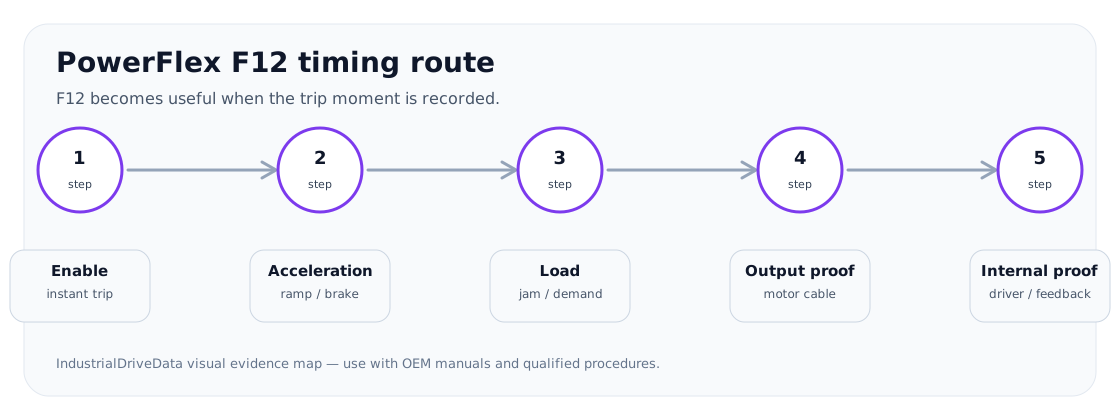
F12 overcurrent timing image
Service decision coverage
F12 cases are usually urgent because the machine will not start or trips under load. The page answers by trip timing instead of by a generic parts list.
| Observed situation | Decision needed | Evidence that satisfies the case |
|---|---|---|
| Trips instantly | External short or internal output fault | Output isolation and fault queue |
| Trips during ramp | Load/brake/ramp or motor data | Current trend, brake state and motor map |
| Trips after module repair | Unresolved driver/current path | Failed parts history and channel comparison |
What F12 means in service terms
F12 should be handled as a severe current event, not as a simple nuisance trip. The first useful question is when it appears: immediately at enable, at first PWM, during acceleration, when a brake should release, under a load step, or after previous power-stage repair.
If F13 or another output fault appears near F12 in the queue, preserve the order. A ground-leakage or cable fault can drive the hardware overcurrent path, while an internal IGBT/current-sense fault can also produce output symptoms.
Evidence order before drive replacement
F12 needs an evidence order that protects the drive and the motor. The route below avoids energising a suspect output path without isolating the cause.
F12 evidence route
| Step | Evidence to collect | Escalation condition |
|---|---|---|
| Trip timing | Enable, first PWM, acceleration, load step, steady run | Instant trips raise output-stage or cable suspicion |
| Mechanical/load | Brake release, jam, overload, acceleration demand | Fault follows load or brake state |
| Motor/cable | Insulation, moisture, terminals, output accessories | Fault persists after qualified isolation |
| Current feedback | Unbalanced or impossible readings, fault queue logic | External path is credible but fault remains |
| Power stage | Static checks, driver condition, repair history | Stop-condition evidence before power-up |
When a repair request is actionable
The repair request should state whether F12 happens with the motor connected, whether any F13/GF evidence exists, whether the brake releases, and whether a module or control board has already been replaced. The best request includes motor-cable evidence and photos of output terminals and power-stage labels.
- Fault queue with first fault
- Motor connected/disconnected result under qualified procedure
- Brake/load status
- Previous module or board replacement
- Drive type and frame
Field record checklist
- F12 timing
- Fault queue
- Load/brake state
- Motor/cable evidence
- Power-stage repair history
Technical basis and reference documents
This is an independent editorial technical reference. Original manufacturer documentation remains controlling for installation, repair and commissioning decisions.
OEM reference for installation, wiring and troubleshooting boundaries.
Diagnostic workflow
Turn this record into a qualified service request
A repair decision is much more reliable when the request includes the exact identity of the drive, the first fault evidence and the machine condition when the symptom appeared.
- Complete drive type code / MLFB or nameplate model
- Fault code, fault value and first event before reset
- When the event appears: power-up, enable, ramp, run, decel or stop
- Motor/cable connected or isolated during the symptom
- Visible board, option-card, module and connector identifiers
- Previous repair history, replacement parts and repeat-failure pattern