
Scope of this technical record
F0003 undervoltage workflow that routes supply, contactor, rectifier, precharge and DC-link evidence before board replacement.
High-voltage input and DC-link measurements are restricted to qualified personnel. Verify discharge before internal inspection.
MICROMASTER F0003 supply workflow route
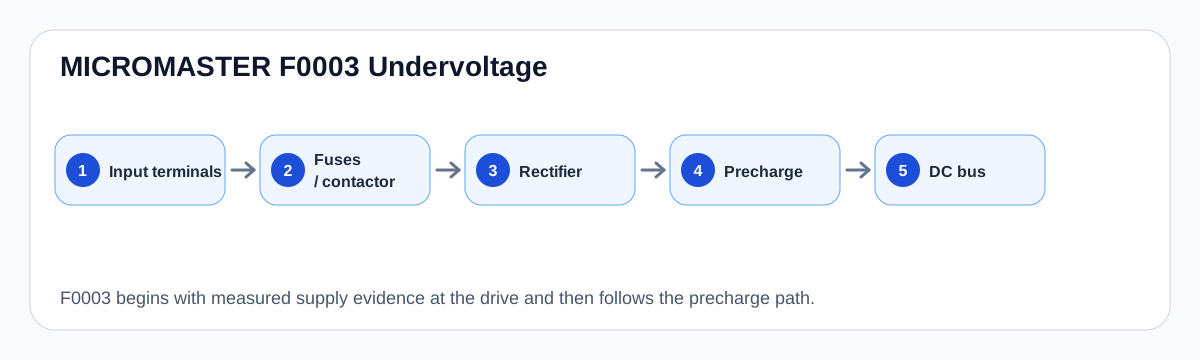
The workflow follows supply evidence to the DC link before a board decision.
MICROMASTER F0003 workflow map
Workflow logic
This workflow starts with the simplest hard evidence: voltage at the drive input terminals during the event. Upstream voltage is not enough. The fault can be caused by a single failed contactor pole, fuse holder, terminal torque problem or momentary plant sag.
If the supply path is credible, the route moves inward: rectifier, precharge, capacitor bank and bus measurement. That inward movement should be documented, not guessed from the existence of an undervoltage code.
F0003 workflow stages
| Stage | Question | Repair implication |
|---|---|---|
| Input | Is the correct voltage present at the drive? | Fix supply/contactor before drive repair |
| Precharge | Does the DC link charge normally? | Precharge or rectifier boundary |
| Bus storage | Does bus sag under load or after idle? | Capacitor or weak supply boundary |
| Control response | Does panel reset with the event? | Control supply affected by bus/input |
| Board escalation | Are external and precharge paths proven? | Then consider board/sense route |
Stop conditions
Do not proceed to internal probing when the input path is not proven. Do not keep cycling power if the drive shows inconsistent bus charging, smell, heating or visible damage. These are repair-boundary observations, not reset targets.
Field record checklist
- Voltage at input terminals
- Phase balance
- Fuse/contactor heat or drop
- Bus charge profile
- Panel reset timing
- Precharge evidence
- Visible capacitor/board condition
Technical basis and reference documents
This is an independent editorial technical reference. Original manufacturer documentation remains controlling for installation, repair and commissioning decisions.
OEM operating material used for MICROMASTER 430 safety, fault and commissioning context.
Manufacturer reference for parameter, fault and alarm routing around the MM4 platform.
Linked records
F0003 indicates the drive has lost a credible DC-bus supply boundary. The evidence route begins outside the drive with phase loss, fuses, contactor poles, loose terminals and supply sag, then moves inward to precharge, DC-link capacitors and measurement circuitry.
Separates external supply loss from internal precharge and DC-link failures when a MICROMASTER drive reports F0003 or shows unstable bus charging.
Turn this record into a qualified service request
A repair decision is much more reliable when the request includes the exact identity of the drive, the first fault evidence and the machine condition when the symptom appeared.
- Complete drive type code / MLFB or nameplate model
- Fault code, fault value and first event before reset
- When the event appears: power-up, enable, ramp, run, decel or stop
- Motor/cable connected or isolated during the symptom
- Visible board, option-card, module and connector identifiers
- Previous repair history, replacement parts and repeat-failure pattern