
Scope of this technical record
Step-by-step PowerFlex workflow for F5 overvoltage and F4 undervoltage where the evidence passes through the input, DC-bus and braking path.
Input and DC-link measurements require qualified procedure. Regenerative loads and brake resistors can remain hazardous after stop.
PowerFlex F5 / F4 workflow route
The workflow splits supply-side undervoltage from regenerated-energy overvoltage.
PowerFlex F4/F5 DC-bus workflow image
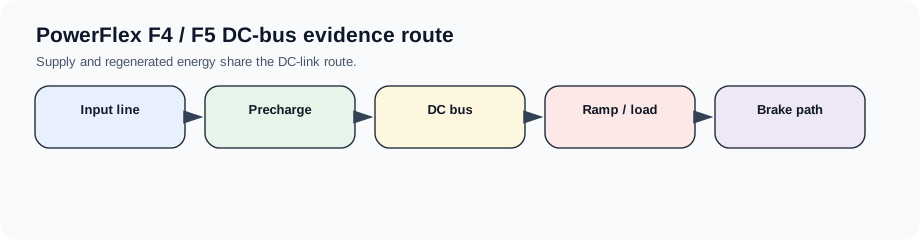
Workflow goal
This workflow keeps the input-energy and regenerated-energy questions together. F4 and F5 are opposite symptoms on the same DC-link route, so the technician should not treat either as a keypad-only or control-board-only issue.
Step sequence
Use the event condition to split line/precharge cases from braking/regeneration cases.
F4/F5 workflow
| Step | Action | Evidence output |
|---|---|---|
| 1 | Classify F4 or F5 and the timing | Power-up, run, accel, decel or stop |
| 2 | Measure input at drive terminals | Line sag, missing phase or high line |
| 3 | Record bus behaviour if available | Low bus, high bus, ripple or transient |
| 4 | For F5, inspect ramp/load/brake path | Regeneration or brake hardware boundary |
| 5 | For F4, inspect fuse/contactor/precharge path | Input/precharge/DC-link boundary |
Output package
The repair request should state whether the bus event is supply-side, load-energy-side or internal measurement/precharge-side. That classification prevents random replacement of control boards, brake resistors or drives.
Field record checklist
- F4/F5 timing
- Input voltage at drive
- DC-bus behaviour
- Brake path
- Precharge path
Technical basis and reference documents
This is an independent editorial technical reference. Original manufacturer documentation remains controlling for installation, repair and commissioning decisions.
OEM basis for installation and troubleshooting context.
Linked records
The DC bus rose above its permitted boundary, usually from regenerated energy, high input line, short decel time, brake path failure or DC-bus measurement issue.
The DC bus or input supply is too low or unstable. The first route is line voltage, fuses/contactors, precharge, DC-link capacitors and supply sag evidence.
Routes F4 and F5 evidence through input phases, fuses/contactors, precharge, DC-link capacitors, brake chopper/resistor, load inertia and line voltage.
Turn this record into a qualified service request
A repair decision is much more reliable when the request includes the exact identity of the drive, the first fault evidence and the machine condition when the symptom appeared.
- Complete drive type code / MLFB or nameplate model
- Fault code, fault value and first event before reset
- When the event appears: power-up, enable, ramp, run, decel or stop
- Motor/cable connected or isolated during the symptom
- Visible board, option-card, module and connector identifiers
- Previous repair history, replacement parts and repeat-failure pattern