
Scope of this technical record
Step-by-step workflow for PowerFlex F81-F86 port-loss cases, preserving device, cable, adapter, noise and command-source evidence.
Do not disconnect or mask communication paths until the machine safe state and command source are understood.
PowerFlex DPI workflow route
The workflow makes the fault follow a removable boundary before control-board replacement.
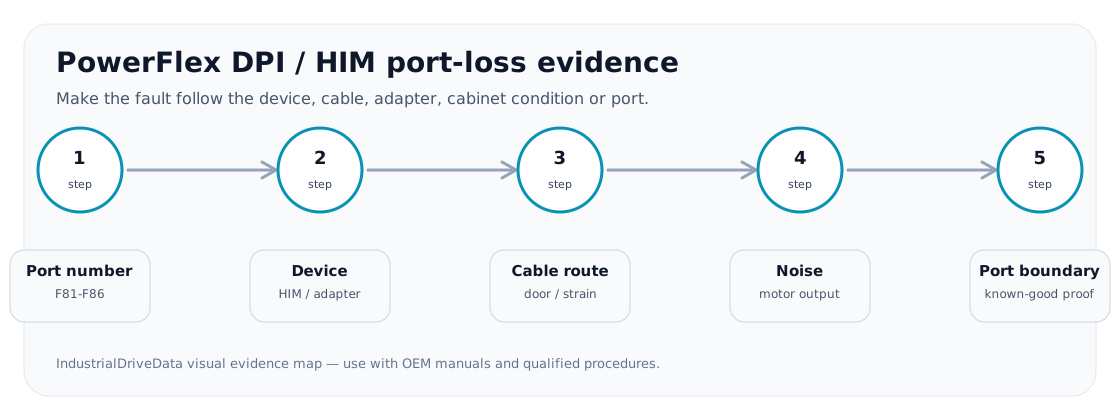
PowerFlex DPI port-loss workflow image
Workflow goal
The workflow makes the fault follow a device, cable, adapter, port or noise condition before replacement. It also records what the lost port controls so production does not solve a nuisance fault by removing a safety-critical status path.
Step sequence
The exact F81-F86 number decides which route to inspect.
DPI/HIM workflow
| Step | Action | Stop condition |
|---|---|---|
| 1 | Record exact fault number and connected device | Port identity unknown |
| 2 | Inspect and move cable/device where permitted | Fault follows cable or HIM |
| 3 | Check adapter/network state | Fault follows adapter/controller state |
| 4 | Review cabinet noise and cable segregation | Fault aligns with switching/noise |
| 5 | Escalate drive port/control board | Device/cable/noise path is proven |
Output package
The output package should state the command and reference impact of the lost port, not only the part suspected. This matters if the drive is controlled from a PLC, remote HIM or safety-related system.
Field record checklist
- F81-F86 exact code
- Port and device
- Cable test
- Noise context
- Control impact
Technical basis and reference documents
This is an independent editorial technical reference. Original manufacturer documentation remains controlling for installation, repair and commissioning decisions.
OEM context for drive interfaces and safe troubleshooting.
Linked records
A DPI device or internal port link was lost. The route begins with port number, cable routing, electrical noise, connected device, adapter state and internal communication hardware evidence.
Routes F81-F86 port-loss evidence through HIM, DPI cable, TCOMM/adapter, port number, electrical noise, grounding and control-board communication context.
Turn this record into a qualified service request
A repair decision is much more reliable when the request includes the exact identity of the drive, the first fault evidence and the machine condition when the symptom appeared.
- Complete drive type code / MLFB or nameplate model
- Fault code, fault value and first event before reset
- When the event appears: power-up, enable, ramp, run, decel or stop
- Motor/cable connected or isolated during the symptom
- Visible board, option-card, module and connector identifiers
- Previous repair history, replacement parts and repeat-failure pattern