
Scope of this technical record
Workflow for converting a 590P OVER I TRIP report into external-current, field, autotune, calibration, current-feedback, board and retrofit evidence.
The workflow stops if the field is not proven, if armature insulation is unsafe, or if repeated resets are being used instead of evidence capture.
590P OVER I TRIP workflow route
The workflow prevents a current-loop or feedback case from becoming a blind board swap.
590P OVER I TRIP workflow
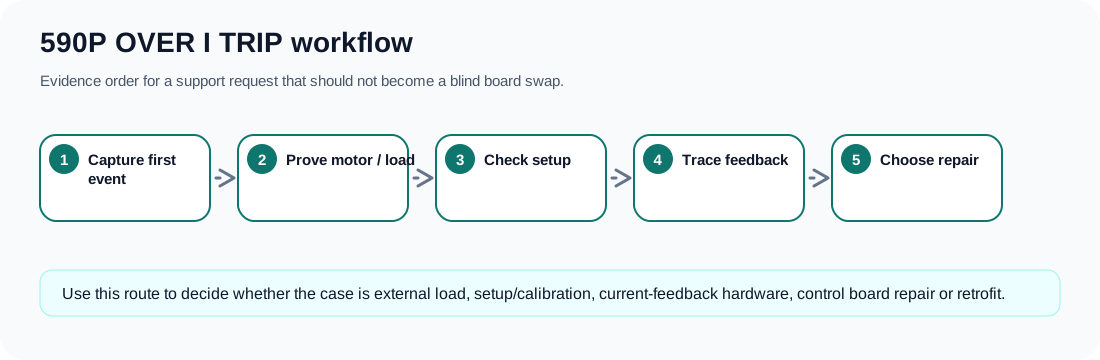
Workflow sequence
Follow the evidence in this order so a real-current problem and a false-feedback problem do not get the same repair.
590P OVER I TRIP workflow
| Step | Evidence | Decision |
|---|---|---|
| 1 | Type code, current rating, regenerative status and motor data | Know whether the drive and motor are correctly matched |
| 2 | First-fault timing and operating condition | Route to autotune, start, acceleration, regeneration or load boundary |
| 3 | Field, armature wiring, motor insulation and machine load | Prove or clear the real-current path |
| 4 | Autotune status, current calibration and parameter history | Separate setup instability from hardware failure |
| 5 | Displayed current versus external evidence | Decide whether current feedback is plausible |
| 6 | ACCT / feedback plug, burden path, feedback rails and board history | Escalate to current-feedback board evidence |
| 7 | Bridge/firing evidence and retrofit constraints | Choose repair, donor board, used drive or modernization |
Stop conditions that protect the repair
The fastest way to lose money on a 590P OVER I TRIP is to keep resetting it or to buy the first board suggested by the alarm text. Stop when field evidence is missing, when armature insulation is suspect, when the current display is impossible, when a connector has been disturbed, or when the drive has unknown copied parameters. Those are evidence gaps, not things to work around.
- Unknown field condition
- Unknown armature insulation
- Autotune not completed
- Impossible current display
- ACCT / feedback connector unverified
- Recent board repair without calibration notes
Field record checklist
- Fault photo
- Trip timing
- Autotune status
- Current calibration
- Field proof
- External current proof
- ACCT / feedback evidence
- Repair objective
Technical basis and reference documents
This is an independent editorial technical reference. Original manufacturer documentation remains controlling for installation, repair and commissioning decisions.
Official source for OVER I TRIP: armature current above calibration value; possible causes include missing autotune, incorrect calibration and unstable current loop.
Official source for 590+ safety boundaries, permanent earthing, field/armature context and parameterised DC-drive operation.
Official converter reference describing current-feedback related trip protection and the importance of feedback hardware in external-stack cases.
Internal reviewed drawings used only as functional evidence for supply, feedback, burden, firing and bridge path mapping; original drawings are not redistributed.
Linked records
OVER I TRIP must be routed as an evidence problem before it becomes a board replacement. The first split is real armature current versus false or distorted feedback; then autotune state, armature-current calibration, current-loop stability, ACCT / burden feedback, field condition, speed feedback and the control-board A/D boundary must be separated.
Routes OVER I TRIP through real armature current, ACCT / current transformer evidence, burden and scaling components, low-voltage feedback supply, A/D conversion and current-loop plausibility before a control-board repair decision.
Separates OVER I TRIP caused by a real current event from an unstable current loop, incorrect calibration, wrong motor data, failed autotune or manual tuning that leaves the loop unstable.
Turn this record into a qualified service request
A repair decision is much more reliable when the request includes the exact identity of the drive, the first fault evidence and the machine condition when the symptom appeared.
- Complete drive type code / MLFB or nameplate model
- Fault code, fault value and first event before reset
- When the event appears: power-up, enable, ramp, run, decel or stop
- Motor/cable connected or isolated during the symptom
- Visible board, option-card, module and connector identifiers
- Previous repair history, replacement parts and repeat-failure pattern