
Scope of this technical record
Calibration, autotune and current-loop stability path for OVER I TRIP cases after commissioning, motor replacement, parameter copy, board exchange or manual tuning.
Do not use tuning changes to hide a hardware fault. The path assumes qualified commissioning procedures and safe machine conditions.
590P current-loop calibration path
Autotune and calibration evidence must be reconciled before hardware is condemned.
590P current-loop autotune and calibration path
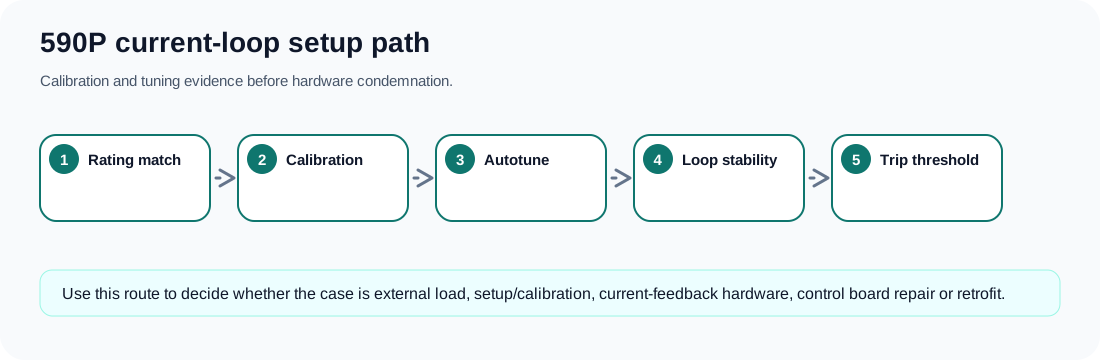
The setup path behind a current trip
Parker documentation ties OVER I TRIP not only to current magnitude but also to missing autotune, incorrect calibration and unstable current loop conditions. That means a page that only talks about motor overload is incomplete for a technician working on a 590P.
The setup path starts with whether the drive rating, armature current calibration, motor data, field data and speed-feedback mode match the installed machine. It then checks whether autotune was completed on the actual motor and whether manual tuning or copied parameters left the current loop unstable.
Calibration and loop-stability evidence
| Evidence | Why it matters | Possible action |
|---|---|---|
| Drive and motor current rating | Wrong scaling can move the trip boundary | Correct rating and calibration data |
| Autotune result | The drive must identify current-loop behaviour | Repeat autotune after hardware/motor changes |
| Manual tuning history | High gain or poor compensation can trip during current build-up | Return to documented tuning route |
| Parameter copy source | A parameter set from another machine may not fit | Compare motor, feedback and field configuration |
| Feedback plausibility | Bad hardware can make tuning impossible | Fix feedback before retuning |
| Machine loading | Real load current can mask a setup problem | Test with controlled, documented load conditions |
Field record checklist
- Motor nameplate
- Drive rating
- Calibration values
- Autotune pass/fail
- Parameter source
- Feedback mode
- Load condition
Technical basis and reference documents
This is an independent editorial technical reference. Original manufacturer documentation remains controlling for installation, repair and commissioning decisions.
Official source for OVER I TRIP: armature current above calibration value; possible causes include missing autotune, incorrect calibration and unstable current loop.
Official source for 590+ safety boundaries, permanent earthing, field/armature context and parameterised DC-drive operation.
Official converter reference describing current-feedback related trip protection and the importance of feedback hardware in external-stack cases.
Internal reviewed drawings used only as functional evidence for supply, feedback, burden, firing and bridge path mapping; original drawings are not redistributed.
Turn this record into a qualified service request
A repair decision is much more reliable when the request includes the exact identity of the drive, the first fault evidence and the machine condition when the symptom appeared.
- Complete drive type code / MLFB or nameplate model
- Fault code, fault value and first event before reset
- When the event appears: power-up, enable, ramp, run, decel or stop
- Motor/cable connected or isolated during the symptom
- Visible board, option-card, module and connector identifiers
- Previous repair history, replacement parts and repeat-failure pattern