
Scope of this technical record
Use this workflow to convert ACS800 PPCC LINK / 5210 into a control-power, link-medium, branch-interface or repair evidence decision.
Follow qualified isolation and discharge procedures before internal checks. Do not repeatedly reset or re-enable output with uncertain link or power-stage evidence.
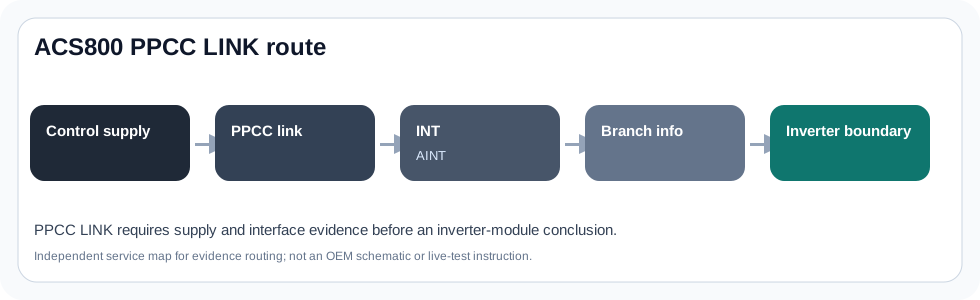
ACS800 PPCC workflow route
The workflow turns 5210 into a branch-specific evidence package.
ABB acs800 ppcc link diagnostic evidence image
Step 1 — classify when the fault appears
The timing determines the first safe route. Power-up PPCC cases prioritise control supply and link readiness. Post-repair PPCC cases prioritise cable positions, branch mapping and board revision evidence. PPCC combined with output-stage faults requires the destructive-fault route to be respected before powered attempts.
Workflow route by timing
| Timing | First route | Evidence to retain |
|---|---|---|
| At control power-up | RMIO/RDCU supply and link readiness | Panel state, 24 V state, link condition |
| After module work | Original branch and connector route | Before/after photos, labels, fault order |
| With suffix/module clue | INT/AINT/PBU mapping | Physical branch map |
| With output-stage fault | Stop and isolate output route | Motor/cable and bridge evidence |
Step 2 — choose the evidence package
A technician should leave this workflow with one package: control-power package, link/connector package, branch-interface package, output-stage package or modernization package. Each package has different photos, measurements and risks.
If the package cannot be completed because the drive type code, branch layout or original cable positions are unknown, the immediate task is identification support. A parts recommendation without that evidence is too weak for a high-value legacy drive.
- Control-power package: panel state, 24 V wiring, RMIO/RDCU label and load evidence
- Link package: fibre/connector condition, route, strain and cleaned/unchanged state
- Branch package: INT/AINT/PBU labels, module map and suffix information
- Output-stage package: external motor/cable proof and static bridge evidence when co-faults exist
Field record checklist
- Fault timing
- Control supply
- PPCC medium
- Branch map
- Labels
- Co-faults
- Repair history
Technical basis and reference documents
This is an independent editorial technical reference. Original manufacturer documentation remains controlling for installation, repair and commissioning decisions.
OEM basis for ACS800 fault messages, PPCC LINK context and interface-related status evidence.
OEM basis for cabinet-drive hardware safety, RMIO/control-board and module arrangement context.
Public field-service discussion showing why fibre-link condition and control-power readiness can matter in PPCC diagnosis.
Linked records
The drive has lost credible communication or status between control electronics and inverter-interface electronics. The service route must separate RMIO/RDCU control-power evidence, fibre or galvanic PPCC link condition, INT/AINT interface state and PBU branch/module routing before any board is replaced.
The PPCC path connects the control side to inverter-interface electronics. Service evidence must keep control supply, PPCC medium, INT/AINT interface and PBU branch routing separate.
This path records how control-board power, external 24 V use, panel state and I/O board identity affect PPCC and dark-control symptoms on ACS800 systems.
This path maps the inverter-interface side of a PPCC case, especially where INT/AINT interface electronics or a PBU branch route the fault to a specific inverter module.
Turn this record into a qualified service request
A repair decision is much more reliable when the request includes the exact identity of the drive, the first fault evidence and the machine condition when the symptom appeared.
- Complete drive type code / MLFB or nameplate model
- Fault code, fault value and first event before reset
- When the event appears: power-up, enable, ramp, run, decel or stop
- Motor/cable connected or isolated during the symptom
- Visible board, option-card, module and connector identifiers
- Previous repair history, replacement parts and repeat-failure pattern