
Scope of this technical record
Step-by-step route for MASTERDRIVES brake release/close issues, load slip and brake-sequence trips.
Vertical or suspended loads must be mechanically secured. Do not test brake release by trial command on an unsecured machine.
6SE70 brake diagnostic workflow route
The workflow prevents unsafe trial release and parameter edits without a baseline.
6SE70 brake workflow image
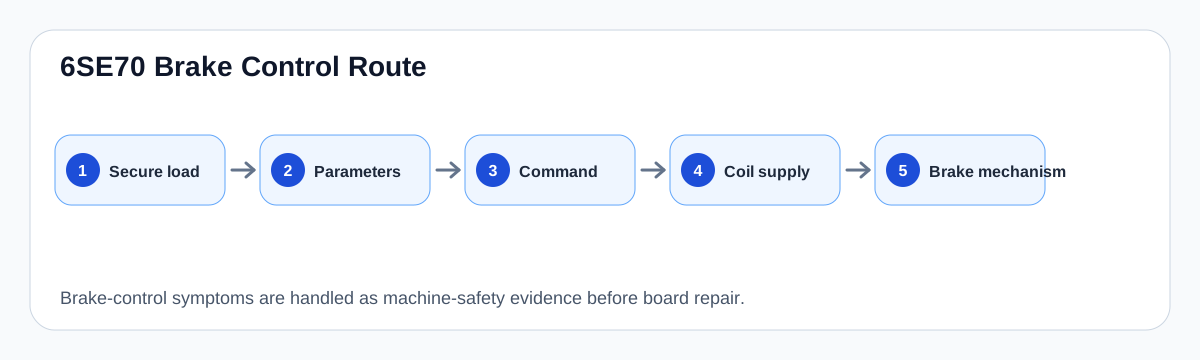
Workflow sequence
The workflow begins with mechanical safety and parameter capture. Only then should the technician verify drive output, coil supply and mechanical brake response. A drive relay can be healthy while the brake remains mechanically stuck, and a brake can be healthy while the coil supply is missing.
If the electrical and mechanical paths are credible but the sequence remains wrong, the case moves to interface/terminal evidence and parameter timing review.
Brake diagnostic workflow
| Step | Evidence | Stop condition |
|---|---|---|
| 1 | Load secured and brake arrangement known | Unsafe motion risk |
| 2 | Current parameter values recorded | No baseline |
| 3 | Output/relay command checked | No command or wrong state |
| 4 | Coil supply verified | Voltage missing or overheating |
| 5 | Mechanical brake inspected | Worn/sticking brake |
| 6 | Controlled sequence test | Unstable load or unresolved evidence |
Field record checklist
- Load secured
- Brake type
- Timing parameters
- Output command
- Coil voltage
- Mechanical brake condition
- Interlock/feedback status
Technical basis and reference documents
This is an independent editorial technical reference. Original manufacturer documentation remains controlling for installation, repair and commissioning decisions.
OEM basis for 6SE70 / 6SE71 safety, control connections, motor temperature evaluation and option context.
Internal technician note set used only to structure public diagnostic routes around KTY/PTC thermal protection and brake-control evidence.
Linked records
The MASTERDRIVES brake-control function depends on release/close delay times, thresholds, output wiring and mechanical brake condition. It must be treated as a functional safety-adjacent motion issue, not a simple relay output problem.
Maps drive brake-control logic to relay output, brake coil supply, release/close delays and mechanical brake condition for hoist and vertical-axis applications.
Turn this record into a qualified service request
A repair decision is much more reliable when the request includes the exact identity of the drive, the first fault evidence and the machine condition when the symptom appeared.
- Complete drive type code / MLFB or nameplate model
- Fault code, fault value and first event before reset
- When the event appears: power-up, enable, ramp, run, decel or stop
- Motor/cable connected or isolated during the symptom
- Visible board, option-card, module and connector identifiers
- Previous repair history, replacement parts and repeat-failure pattern